
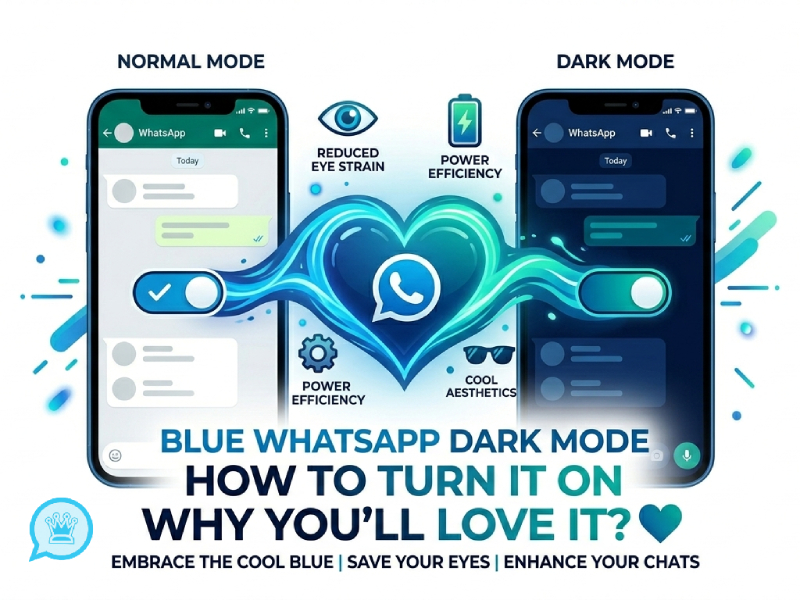
Dark mode has become a standard feature in most instant messaging applications. It switches the bright interface to a darker tone, making it more comfortable for the eyes and more suitable for nighttime use. In Blue WhatsApp, dark mode is more than just about appearance, and many users actively enable WhatsApp dark mode as part of their daily settings because it can also reshape the overall app experience, making interactions feel smoother, simpler, and more visually balanced while reducing visual strain during long chats.
We have talked about the ways to import and render third-party typography in Blue WhatsApp. This guide will explain how Blue WhatsApp’s dark mode works, how to turn it on, and why many users prefer it over the regular light theme.
What is Dark Mode in Blue WhatsApp
The dark mode in the blue WhatsApp app is a display setting that changes the app’s interface from a bright background to a darker one. The application no longer uses the usual white or light gray screen, but instead adopts dark tones such as dark blue, black, and charcoal gray. This change affects almost every part of the app, including chats, menus, settings, and profile pages, and it can also be appreciated by users who are specifically looking for compatibility options such as dark mode whatsapp ios 12 on older iOS devices, where system-wide dark themes were later introduced.
The main idea behind Dark Mode is to reduce visual brightness, thereby creating a more balanced viewing experience. The text and icons will be adjusted to remain legible even against a darker background. The color tone of the message bubble will also change slightly to make the conversation stand out more without appearing too bright or glaring.
In daily use, dark mode makes the blue WhatsApp look more sophisticated. Because the background doesn’t distract from the conversation, you can focus more on the content. It also makes the design of the entire application more consistent, as each part uses the same dark style, rather than mixing light and dark elements.
In short, the dark mode of blue WhatsApp is more than just a color change. This is a complete theme tweak that impacts design, readability, and the overall user experience in a simple yet significant way.
How to Turn On Dark Mode in Blue WhatsApp
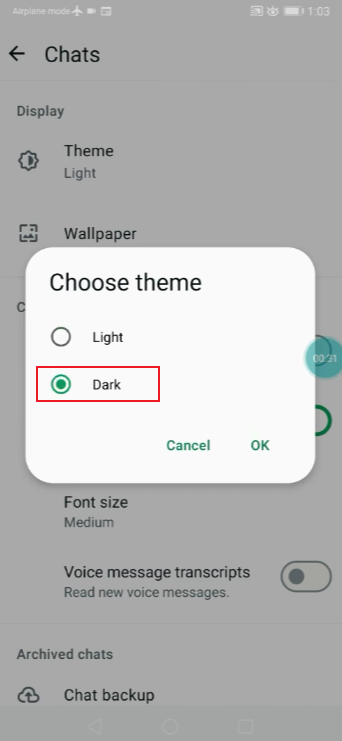
Enabling dark mode is very simple, requiring only a few steps. The specific names may vary slightly depending on the version, but the basic steps are the same.
Step-by-step guide
- Open Blue WhatsApp on your phone
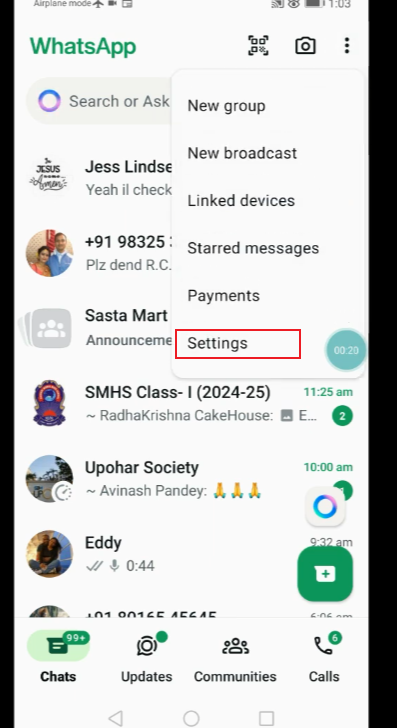
- Tap the three-dot menu in the top corner
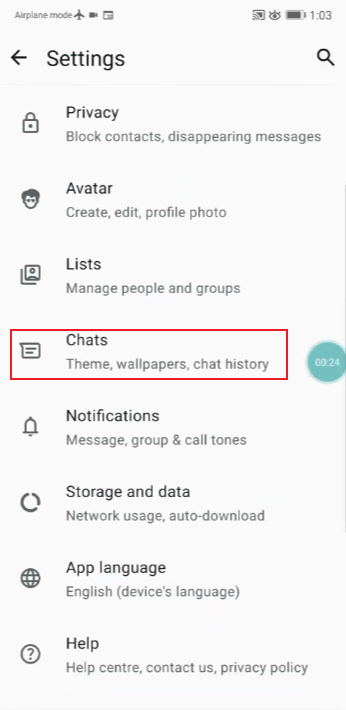
- Go to Settings
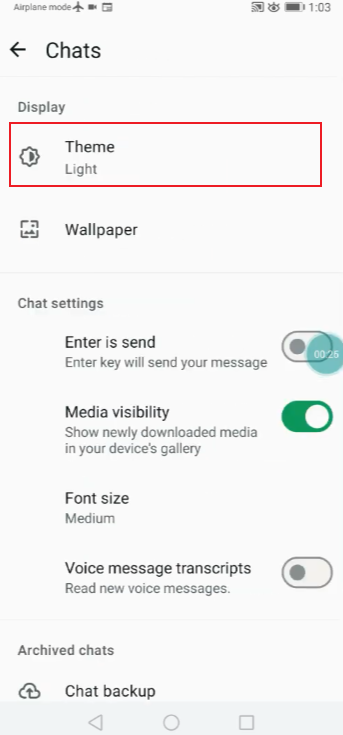
- Open the Theme or Appearance section
- Select Dark Mode
- Apply the changes and return to your chats
Once enabled, the interface will switch immediately. No restart is required; all chats will adopt the new theme.
Some versions also include an automatic switching option that allows you to switch between light and dark modes depending on the time of day.
Why Dark Mode Feels Better to Use
Dark mode is not just a visual change; it also affects the user experience of applications in daily use. Many people switch to dark mode after using it for a while because it provides a more comfortable viewing experience and is suitable for different scenarios, whether at night, in low-light environments, or during long screen sessions. For example, on older devices or systems like whatsapp dark mode ios 12, users still look for ways to enjoy a softer interface that reduces eye strain while keeping the app easy to navigate.
1. Less visual strain in low light
When using a mobile phone in a dark room or at night, a bright screen can be glaring. Dark mode reduces screen brightness and replaces it with a softer hue. This makes reading information feel more natural, and you won’t feel tired even after reading for a long time.
2. Easier focus on conversations
A dark background naturally draws attention to the chat content. Message bubbles, names, and emoticons are now clearer and more prominent. With less background noise, the dialogue feels more direct and easier to understand.
3. More balanced screen brightness
In light mode, the contrast between a bright white background and dark text may be too strong. Dark mode reduces this contrast, making the screen display more balanced. This makes scrolling through longer chat logs feel smoother and easier.
4. Better look for colors and media
Photos, stickers, and emojis tend to appear more vibrant against a dark background. The colors appear deeper and clearer. This allows the chat content to present a richer visual effect without changing the content itself.
5. More comfortable long usage
A soft interface helps reduce eye strain when chatting for extended periods or switching between apps. Dark mode can prevent the screen from being too bright, especially during prolonged use.
6. Feels more modern and clean
Many users prefer the look of dark mode. It gives apps a more modern feel, a cleaner layout, and less visual clutter. The overall user experience is also more organized and relaxing.
Design Changes You Will Notice
Switching to dark mode is not just about changing colors. Some minor design tweaks have made the experience smoother.
1. Chat interface
In the blue version of WhatsApp, the color of the chat bubbles is slightly adjusted to match the darker background. Sending messages typically use stronger color contrast, while receiving messages maintain softer colors.
2. Menu layout
The settings and menus use a darker color scheme, with clear boundaries between different sections. This helps users avoid visual distractions when browsing options.
3. Icons and indicators
The icons for calls, attachments, and status indicators have been redesigned to remain visible without being too bright.
4. Profile pages
The contact profile and group information pages also use the same dark theme to maintain consistency throughout the application.
Light Mode vs Dark Mode Experience
| Feature / Aspect | Light Mode Experience | Dark Mode Experience |
| Screen Brightness | Bright and clear, strong white background | Lower brightness, dark background tones |
| Eye Comfort | Can feel harsh in low light | Softer and more comfortable at night |
| Reading Experience | Text stands out in daylight | Text feels more focused in dim environments |
| Visual Style | Clean, classic, traditional look | Modern, minimal, slightly premium feel |
| Battery Usage (OLED) | Slightly higher consumption on some devices | More efficient on OLED screens |
| Focus on Content | Background may feel more dominant | Messages and content stand out more |
| Best Usage Time | Daytime, bright environments | Nighttime or low-light settings |
| Overall Mood | Bright, active, energetic | Calm, relaxed, less visually intense |
Customization Options with Dark Mode
Blue WhatsApp’s dark mode isn’t a single, fixed look; it also serves as the basis for many subtle design tweaks, helping users customize the app to their own style. With dark mode enabled, the interface becomes much easier to adjust because most elements have adopted a unified color scheme, and this is especially noticeable when using dark theme whatsapp, where the overall visuals feel more consistent and comfortable for extended use.
One of the main options is chat wallpaper. Even in dark mode, users can choose different backgrounds for their chats. Some people prefer simple, dark textures, while others opt for sophisticated patterns to personalize conversations without compromising readability. The choice of wallpaper can often change the “warm” or “fresh” feeling of a chat.
Font and text size are also crucial. Dark mode itself improves readability, but adjusting the text size can make longer chat logs easier to read. Larger text generally works better in low-light environments, while smaller text keeps the interface clean and clear.
Blue WhatsApp may also include a feature to adjust the bubble style. These settings can change the shape or spacing of message bubbles. In a dark theme, even small changes like rounded corners or smaller spacing can make the chat interface look more modern or spacious, depending on the user’s preference.
Finally, some versions also allow you to adjust the notification preview style. This helps maintain consistency between the app’s dark interface and how messages outside the app are displayed.
Why Blue WhatsApp Users Prefer Dark Mode
WhatsApp Blue users choose dark mode not only for aesthetic reasons, but also to improve their daily user experience. This preference usually stems from a combination of considerations such as comfort, style, and ease of use. The main reasons will be explained in detail below.
1. Better reading comfort in long chats
Dark mode reduces screen brightness, making text easier to read, especially during long chats, and reducing eye strain. This is one of the most common reasons why users switch to dark mode and use it for a long time.
2. More focused chat experience
In dark mode, there is less background distraction, and attention naturally focuses on the information itself rather than the interface. This makes the conversation more direct and clear, especially in busy group chats.
3. Cleaner and more modern look
Many users believe that dark mode makes Blue WhatsApp look more sophisticated and modern. Dark backgrounds make emojis, stickers, and avatars stand out more, thus enhancing the overall visual balance.
4. Better experience in low light
Dark mode feels more natural when using your phone at night or in low-light conditions. The screen isn’t too bright, so it blends better into its surroundings and is smoother to use.
5. Matches other apps and system themes
Most phones now support system-level dark mode. Blue WhatsApp users like consistency, so matching the app with other dark theme apps can make the entire device look more unified.
Final Thoughts
WhatsApp Blue’s dark mode is more than just a design option. It changed the overall feel of the app, how messages are displayed, and the comfort of long-term use.
The setup is quick and easy, the interface is simpler, and the experience of long conversations is smoother. Many users, once they switch to dark mode, rarely switch back to normal mode.
Whether you’re using WhatsApp during the day or at night, dark mode makes chatting more comfortable and provides a more balanced visual experience.


