If you’ve ever hidden a chat using the lock feature in WhatsApp, you might later struggle to find it again. Many users report issues like whatsapp blue chat lock not showing or forgetting how to access locked conversations.
This guide explains exactly how to open hidden locked chats, recover access using a secret code, and troubleshoot common issues especially if you’re using modified versions like WhatsApp Blue.
What Is WhatsApp Chat Lock?
The Chat Lock feature allows you to hide specific conversations behind a password, fingerprint, or secret code. Once locked, these chats disappear from your main chat list and move to a hidden section.
This is useful for:
- Protecting private conversations
- Keeping sensitive chats hidden
- Preventing unauthorized access
How to Open Hidden Locked Chats in WhatsApp
Method 1: Access via Chat Lock Folder
- Open WhatsApp
- Scroll down on your chat list
- Look for “Locked Chats”
- Tap it
- Authenticate using your fingerprint, Face ID, or password
Once unlocked, your hidden chats will appear.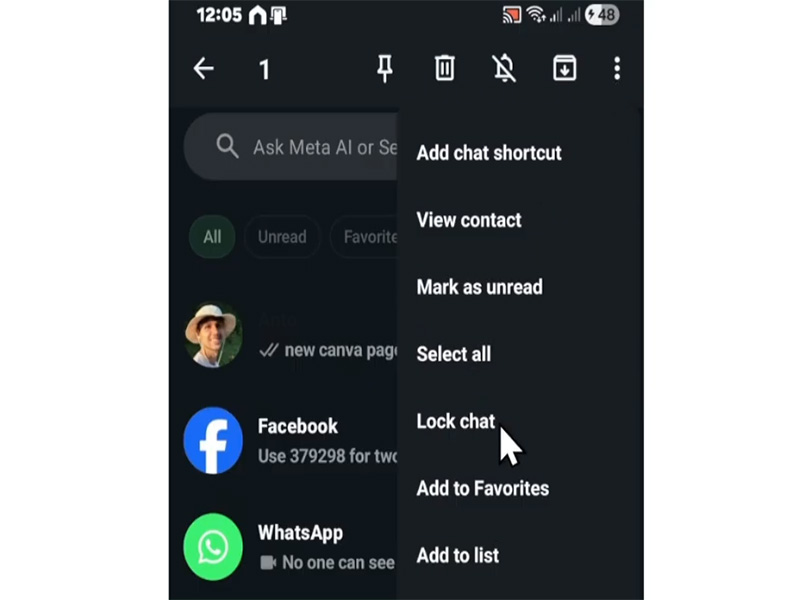
How to Unlock a Locked Chat on WhatsApp with Secret Code
If you enabled a secret code instead of biometrics, here’s what to do:
- Open WhatsApp
- Use the search bar at the top
- Type your secret code exactly
- The hidden chat folder will appear
- Tap it and enter the code
This is the official way for how to unlock a locked chat on whatsapp with secret code, especially when chats are fully hidden.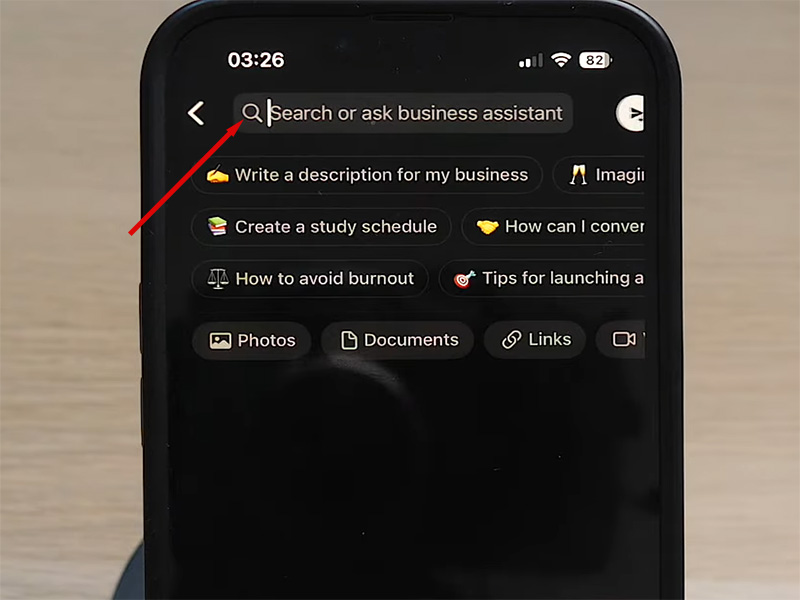
Fix: WhatsApp Blue Chat Lock Not Showing
Many users of modded apps face this issue. If you’re experiencing whatsapp blue chat lock not showing, try these fixes:
- Check App Version
Make sure you’re using the WhatsApp Blue Latest Version, as older versions may have bugs.
- Clear Cache
- Go to phone Settings
- Open Apps → WhatsApp Blue
- Tap Storage → Clear Cache
- Restart the App
Close and reopen the app to refresh hidden features.
- Re-enable Chat Lock
- Open the chat
- Tap contact name
- Disable and re-enable Chat Lock
- Reinstall the App
If nothing works, reinstall the latest version (backup your chats first).
Extra Privacy Features in WhatsApp Blue Anti-Ban 2026
The WhatsApp Blue Anti-Ban 2026 version offers more than just chat lock:
- Hide blue ticks
- Freeze last seen
- Lock specific chats with PIN
- Hide chats completely (not just lock)
- Anti-delete messages
- Custom themes
These features make it more powerful than the official WhatsApp—but also less stable in some cases.
Tips to Stay Safer:
- Avoid sending bulk messages
- Don’t use automation tools
- Keep the app updated
- Link your number carefully
Bonus: How to Unhide Chats Permanently
If you no longer want a chat to be hidden:
- Open Locked Chats
- Select the chat
- Tap contact name
- Turn off Chat Lock
The chat will return to your main inbox.
Final Thoughts
Opening hidden locked chats in WhatsApp is simple once you know where to look. Whether you’re using the official app or a modded version, understanding features like secret codes and lock folders is key.
If you’re dealing with issues like whatsapp blue chat lock not showing, updating your app and checking settings usually solves the problem.
FAQ
- Why can‘t I find my locked chats?
You may need to:
- Scroll to the top
- Enter your secret code
- Or update your app
- Can I recover a forgotten secret code?
Usually no. You may need to:
- Restore backup
- Or reinstall the app
- Are locked chats visible in notifications?
No, message content is hidden for privacy.