
Your WhatsApp Business profile is often the first point of contact between your business and potential customers. A clear, complete, and well-structured profile, including your whatsapp business description, helps people quickly understand the services you offer and decide whether to contact you. Small details can significantly improve your profile performance.
Here are some practical tips to help you enhance the image of your WhatsApp Business and make it more effective in daily communication and customer interactions.

1. Start with a clear business name and category
When people find you on WhatsApp, your business name is usually the first thing they notice. This may seem insignificant, but it can directly affect a user’s first impression, and it also works together with your business description for WhatsApp to shape how professional and trustworthy your profile feels at a glance. If the name is too long, vague, or contains too many redundant words, users may hesitate to open the chat window. A concise and clear name helps users recognize you more quickly and are more willing to engage in conversation.
In addition, maintaining consistency of the company name across different platforms is also crucial. People feel a sense of stability and trust when they see the same name on social media, websites, and WhatsApp. Even minor differences in spelling or formatting can make your brand appear inconsistent, thus reducing brand recognition over time.
The category you choose in WhatsApp Business is just as important as the name itself. It allows users to understand the type of service or product you offer before they even read your description. For example, catering, beauty, or consulting services can evoke different expectations. When the category matches your actual business, users can quickly determine whether they have found a suitable merchant.
Your business name and category together form a quick self-introduction. They don’t need to be creative or complicated; they just need to be accurate, simple, and easily identifiable at a glance.
2. Use a strong and recognizable profile photo
Your profile picture is often the first visual element that people notice when they open a chat window or see your business in their contact list. It’s like a small visual ID card, so it needs to be clear and easy to remember.
Keep it simple and easy to recognize
Simple and clear designs usually work best. If using a logo, ensure it is centered and not overly complex. The text inside the logo is often difficult to read on a mobile phone screen, so it is best to avoid using it.
If you are an independent service provider, a well-lit and clear headshot is also a good option. The key is to make yourself instantly recognizable.
Make sure it looks good at a small size
Most users will see your profile photo in a very small circle. Because of that:
- Avoid thin lines or tiny elements
- Use a strong contrast between the background and the main subject
- Check how it looks when reduced in size before setting it
A photo that looks good when large may lose clarity when scaled down.
Stay consistent across platforms
If possible, use the same profile picture on social media, websites, and instant messaging apps such as WhatsApp Business. Maintaining consistency helps users recognize your brand more quickly and build familiarity.
Avoid frequent changes
Frequently changing profile pictures can confuse long-term customers. Keeping your profile picture consistent helps people remember you more easily and reduces their uncertainty when they contact you again.
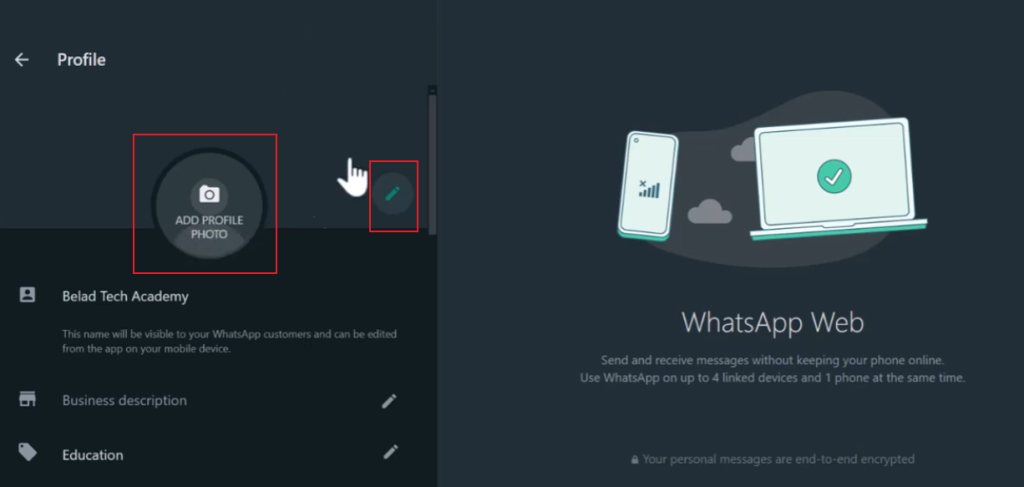
3. Write a simple and direct “About” section
The “About” section is usually the first short text people read when they open your profile. It should be concise and clear, allowing for quick browsing and explanation of your business content. Instead of writing a long paragraph, it’s more effective to break down information into clear key points.
Here is how you can structure it in a simple way:
State what you offer clearly
Mention your main product or service in a direct way. Avoid vague words.
Example: “We provide home cleaning services for apartments and offices.”
Add who your service is for
This helps people immediately know if it fits their needs.
Example: “Serving individuals, families, and small businesses in the city area.”
Highlight your main value
Focus on what makes your service useful or convenient.
Example: “Fast response and flexible booking times.”
Keep language short and natural
Avoid long sentences or marketing-heavy wording. The goal is clarity, not promotion.
Avoid too many details
Please do not include pricing, service lists, or policies in this section. This content can be placed in other locations within your profile.
A good “About” section should flow naturally, like a brief self-introduction in a conversation. This structure is very effective if someone can understand your business in a few seconds.
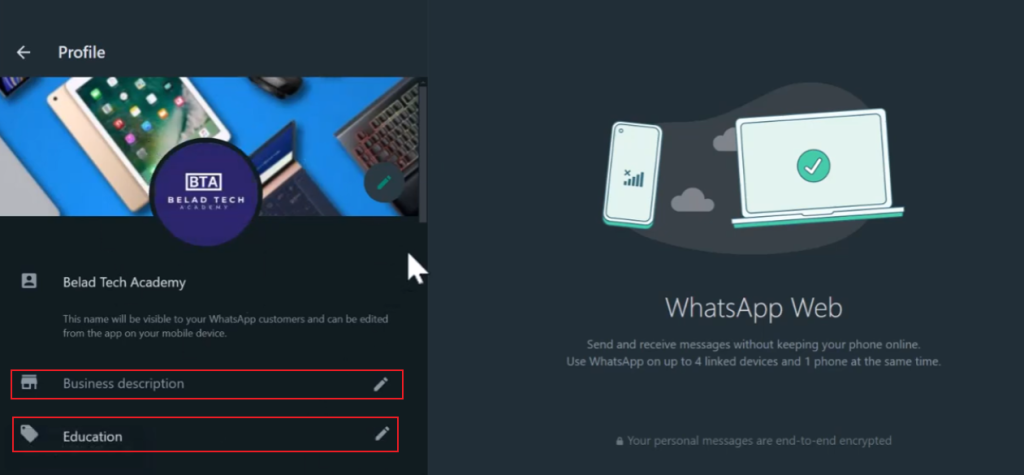
4. Set up your business description and details properly
In WhatsApp Business tools, the profile details section is often overlooked, but it plays a crucial role in how people learn about your business at first glance. A well-designed setup helps reduce user hesitation, making it easier for them to decide whether to contact you, and this becomes even more important when you are using a WhatsApp Business version that relies heavily on clear and trustworthy profile presentation to build first impressions and encourage faster customer engagement.
Fill in the basic information. Your phone number, email address, and website must always be correct and checked regularly. Even minor errors can lead to a crisis of trust or the loss of information. If you provide multiple contact methods, please select the options you view most frequently, rather than listing them all without any purpose.
If you provide services to customers in a physical store, then your business address is also crucial. Ensure the address is accurate and consistent with your other online information. For service-oriented or online businesses, it is best to clearly state the scope of your services rather than leaving it blank. This can avoid misunderstandings and help clarify customer expectations as early as possible.
Business hours should reflect actual working hours. If your working hours differ between weekdays and weekends, it is recommended to set different schedules. This avoids users expecting an immediate response when you are not actually online.
5. Use a catalog to show your products or services
The product catalog feature is one of the most useful features of WhatsApp Business. It’s like a mini product page within a chat window, allowing users to learn about your products and services without having to ask for details.
To make better use of this feature, you need to consider not only how to add products, but also how to display them.
Keep product images clean and consistent
Images are often the first thing people notice in a product catalog. Please use clear, concise, and well-lit photos. Try to maintain a consistent style for all product images to make the product catalog look neat, professional, and aesthetically pleasing.
Use short and clear product titles
Avoid using long or complicated names. Product titles should be concise, clear, and easy to understand. The title should not contain all the descriptions, but should focus on highlighting the core features of the product.
Write practical descriptions
The product description should clearly state what the product is and its purpose. The language should be concise and clear. Highlight key points such as size, material, function, or main advantages, rather than going on at length.
Group items in a logical way
If you have multiple products or services, please categorize and organize them. For example: “New product launch”, “best-selling products,” or “services”. This helps users find the content they need more quickly and reduces confusion.
Keep prices and details updated
A directory can only be effective if the information is accurate. Please check prices, inventory, and details regularly. Outdated information can disrupt conversations and reduce trust.
Building a well-structured catalog in WhatsApp Business can make your profile look more complete and help turn simple chats into actual customer actions.
6. Create quick replies for common questions
Quick replies are one of the most useful tools in WhatsApp Business because they help you respond faster and avoid repeatedly typing the same content. Over time, most businesses will find that many customer messages are very similar, so preparing responses in advance can save a lot of time and maintain consistency in communication.
The key lies not only in creating shortcuts but also in designing natural, smooth, clear, and easy-to-understand messages. A good, quick reply should sound like what you would type in a normal conversation, only more organized.
Final thoughts
Optimizing your WhatsApp Business profile isn’t about adding everything at once, but about eliminating confusion and making information easy to understand.
When your profile is clear, structured, and consistent, it naturally increases people’s responsiveness to your business and makes conversations flow more smoothly.


