
WhatsApp statuses are a convenient way to share updates, photos, or short videos with your contacts. However, many people do not fully understand who can see their status updates and how to control them, especially when using features like whatsapp status for daily sharing without adjusting privacy settings carefully. If you value privacy, it is essential to understand how these settings work and how to adjust them to your needs so that only the right people can view your updates.
We have shared the ways to fix audio distortion and voice note glitches in Blue WhatsApp before. This article will explain in a clear and easy-to-understand way who can view your WhatsApp status and how to manage privacy.
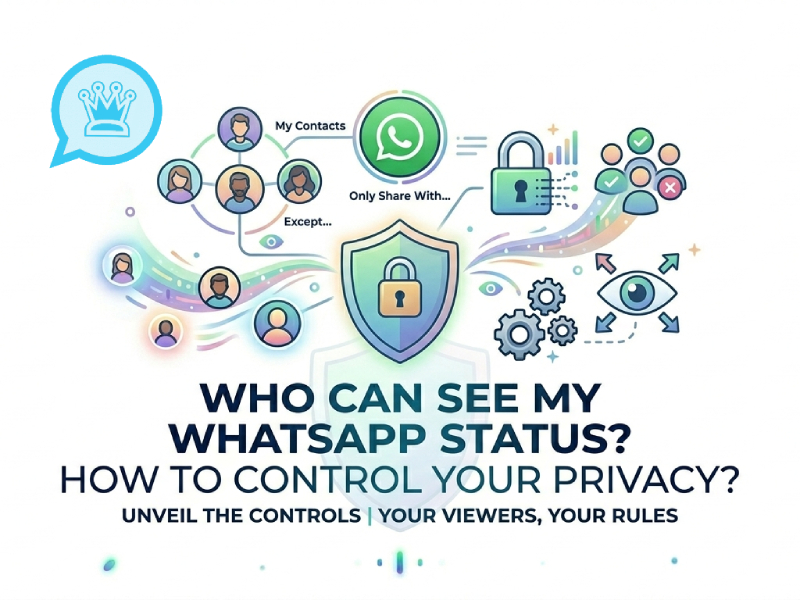
What Is WhatsApp Status
WhatsApp statuses are a feature of WhatsApp that allows you to share short updates with your contacts for a limited time. These posts will disappear after 24 hours, so they are more like temporary posts than permanent content, and they are often used to share daily moments, thoughts, or quick updates without affecting your whatsapp profile, which stays as your main personal identity on the app.
You can think of WhatsApp statuses as a simple way to show what you’re doing or thinking without sending a separate message. It will appear in a separate “Status” tab within the app, which your contacts can click to view.
A WhatsApp Status can include different types of content:
- Photos taken from your phone or gallery
- Short videos
- Text-based updates with colors or backgrounds
- Emojis, links, or simple messages
Unlike regular chat messages, status updates are shared with multiple people simultaneously, depending on your privacy settings. This makes them ideal for quickly updating your social media feed, sharing everyday moments, or sharing content without initiating a conversation.
In summary, WhatsApp statuses are designed to let you make short, simple, and time-limited shares within your existing network of contacts.
Who Can See Your WhatsApp Status
When you post a WhatsApp status, the people who can see it are not randomly assigned, but determined by your privacy settings and contact list. WhatsApp offers several clear ways to control your audience.
1. Your Saved Contacts
By default, your status is usually visible to people saved in your phone contacts.
- If someone is in your contact list, they may see your updates
- You will also appear in their status list if they saved your number
- This is the most basic and common setting
In this case, visibility depends heavily on whether both sides have saved each other.
2. People You Have Allowed in Settings
You can adjust who sees your status inside the privacy settings.
- You can allow all contacts
- You can exclude specific people
- Or you can limit viewing to only selected contacts
This means even if someone is saved in your phone, they may not see your status if you block them in settings.
3. Selected Audience Only
If you choose a more controlled option, only specific people will see your updates.
- You manually pick who can view your status
- Everyone else is automatically excluded
- Useful when you want to share updates with a small group
This gives you full control over your audience size.
4. Hidden Contacts
Some contacts may not see your status at all, even if you are still connected.
- They will not receive your updates
- They are not notified about being excluded
- They remain in your contact list but are removed from visibility
This is often used for quiet filtering without changing contact relationships.
5. Mutual Visibility Conditions
In some cases, visibility depends on both users.
- If you do not have their number saved, they may not see your status
- If they have strict privacy settings, your updates may not appear to them
- WhatsApp does not always show the same content to both sides
This makes status visibility more flexible than it first looks.
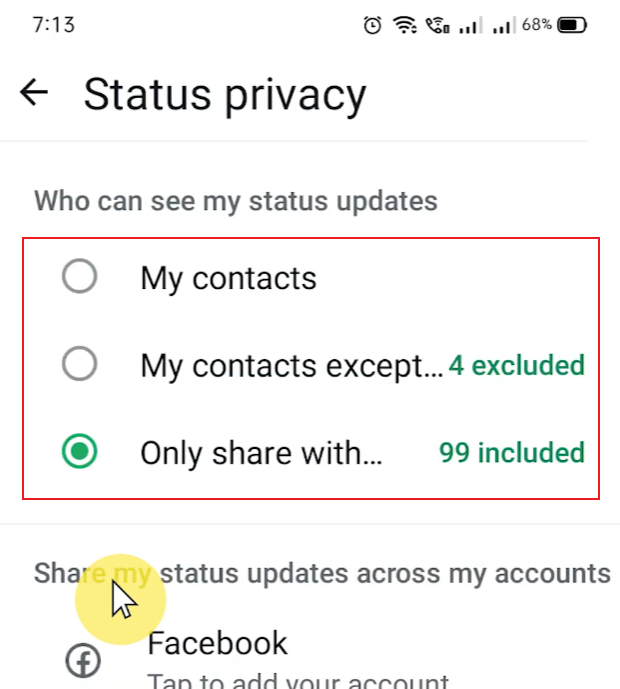
How to Change WhatsApp Status Privacy
You can change your settings in a few steps:
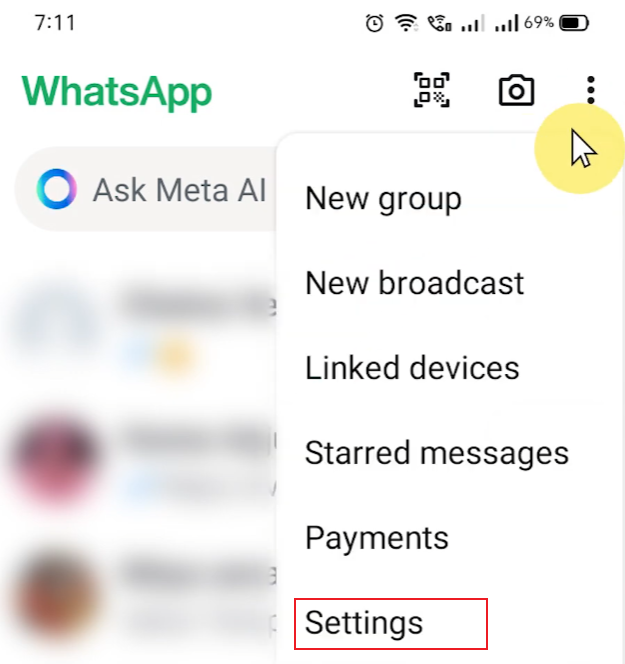
- Open WhatsApp
- Go to Settings
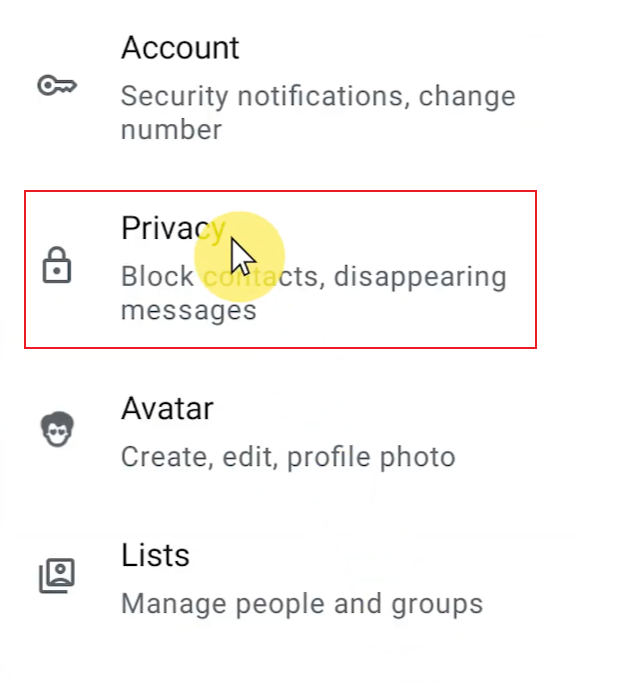
- Tap Privacy
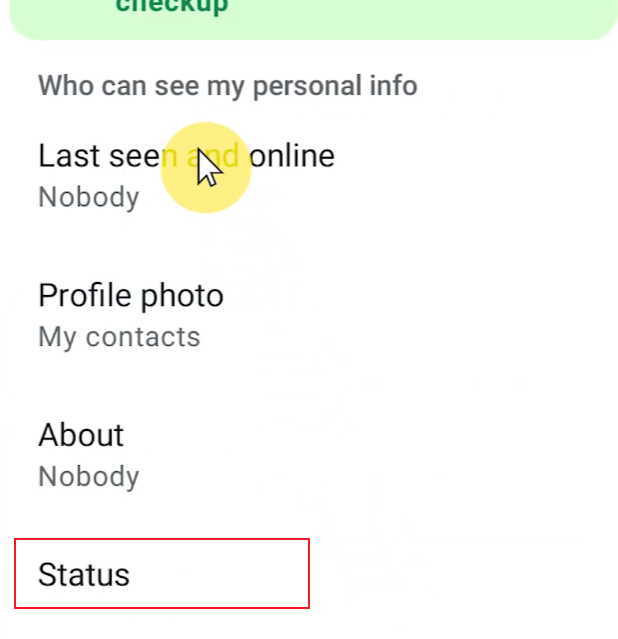
- Select Status
- Choose one of the three options
Once set, your future status updates will follow this rule automatically.
Can You See Who Viewed Your Status
Yes, WhatsApp allows you to see who viewed your status, but only for each status and only within a limited time frame.
When you post a status update, WhatsApp tracks basic view information, and a whatsapp profile viewer helps you understand who has interacted with your content so you can see how the interaction is going. This is not a real-time automatic feedback; you need to manually turn on the status to view the viewer list.
To view the list of viewers, simply open your status and swipe up on the screen. It will appear in the contact list after viewing this status. Even if someone views your status multiple times, it will only be displayed once.
This feature is very useful because it allows you to clearly see who is following your updates. For example, you can see if close friends, specific contacts, or a wider group have viewed the content you posted. It can also help you understand which types of content are more popular with your audience.
This feature allows you to easily understand the interaction while protecting the viewer’s privacy.
What Happens When You Block Someone From Status
When you block someone from seeing your WhatsApp status, the change is silent and very simple. This will only affect their ability to see your status updates, and will not affect your chat history or other WhatsApp features.
They won’t see your future status updates
Once you hide your status from a contact, all new updates you share will no longer appear on their device. Even if you post multiple updates in a day, they won’t see any of them. From their perspective, it’s as if you haven’t posted any content at all.
No notification is sent
People you have blocked will not receive a notification. WhatsApp will not send any notifications or messages regarding this change. Therefore, this adjustment remains private and will not attract attention.
Your past status views have not changed
If the other person had already seen your status updates before you changed your settings, those viewing records will remain unchanged. Privacy settings only take effect from the moment you update them; they do not apply to content shared previously.
You still remain contacts
Blocking someone from status sharing does not remove them from your contact list. You can still send each other messages, make phone calls, and interact normally in chat. Only the status sharing feature will be affected.
In summary, this feature allows you to subtly adjust your audience without disrupting normal communication.
Tips for Better Status Control
Managing your WhatsApp statuses effectively involves more than just choosing who can see your posts; it also involves developing simple habits that make your sharing more organized and easier, including paying attention to details like whatsapp profile photo size when updating your account, which helps keep your profile presentation consistent across updates. With just a few adjustments, you can gain better control of everything without putting in extra effort.
1. Review Your Audience from Time to Time
Managing your WhatsApp statuses effectively involves more than just choosing who can see your posts; it also involves developing simple habits that make your sharing more organized and easier. With just a few adjustments, you can gain better control of everything without putting in extra effort.
2. Use “My Contacts Except…” for Flexibility
This option is very useful if you still want to share with most people but wish to exclude a minority. It saves time because you don’t have to switch to full privacy mode every time.
3. Switch to “Only Share With…” for Specific Moments
Sometimes, you only want a small group of people to see the content you post. In this situation, choosing a few trustworthy contacts is the simplest approach. This helps you clearly define your audience and avoid confusion.
4. Separate Different Types of Updates
Not every status update needs to be targeted at the same audience. You can categorize your posts, such as daily updates, personal life, or work-related content.
By adjusting privacy settings based on post type, you can take better control of everything without having to worry about it every time.
5. Avoid Over-Sharing in One Setting
If you consistently use the same privacy setting, your content may reach people you don’t intend to reach. Occasionally switching settings can help you match your audience with content more accurately.
A quick check before publishing can be very helpful.
6. Keep Your Settings Simple and Consistent
You don’t need to change the settings every day. The goal is to find a balance that suits your daily use.
Once you find the right settings, you can set them as the default and adjust them only when needed.
Final Thoughts
WhatsApp’s status feature is designed to be simple and easy to use, but its privacy settings give you real control over who can see your status. By understanding the three main options and adjusting them as needed, you can precisely determine the level of public accessibility of your posts.
With just a few minor changes to the settings, you can make your daily use more convenient and controllable without altering how the application works.


