
Whether it’s a promotion, a completed project, a fitness goal, or a creative endeavor, these achievements deserve to be celebrated. You might want to share with more people than just your friends.
Blue WhatsApp gives you far more flexibility than the standard WhatsApp version. In this guide, you will learn how to share achievements seamlessly on the Blue WhatsApp APP, why communities matter, how to personalize accomplishment posts, and how to use advanced features effectively.
Part 1: How to Achieve a WhatsApp Community Successfully
WhatsApp Communities are great places for groups and teams to connect, share updates, and celebrate their successes together. The process is straightforward and can be done directly from the Chats tab in the latest versions of Blue WhatsApp Plus.
- Open WhatsApp and navigate to the Chats tab.
- Tap the New Chat icon or the three-dot menu in the top-right corner.
- Select New community.
- You will be prompted to set up your community. Enter a name up to 100 characters, an optional description to clarify its purpose, and add a community icon.
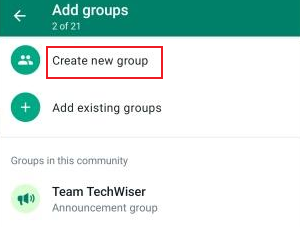
- Next, you can add existing groups you administer or create new groups to include under this community.
- Tap Create.
When you create a community, an Announcement Group is made automatically. Admins use this channel to send updates to everyone in all linked groups, making it ideal for sharing important news or big achievements.
How to achieve a WhatsApp community that people actually enjoy joining.
- Define a Clear Purpose: Use the community description to state its goal, e.g., “A space for our team to share weekly accomplishments and celebrate growth.”
- Leverage the Announcement Group: Reserve this for major milestones, team-wide congratulations, or inspirational messages to keep everyone aligned and motivated.
- Structure Groups Thoughtfully: Create sub-groups for different departments, project phases, or types of achievements, e.g., “Sales Wins,” “Personal Development,” “Client Kudos,” to keep discussions organized.
- Foster Engagement: Encourage members to post their wins, big or small. A culture of recognition boosts morale and motivation.
- Use Personalized Community Themes: You can create Blue-themed communities, Gaming-style interfaces, Professional business layouts.
Part 2: Share Through WhatsApp Status
The WhatsApp Status feature update visible to your contacts is a powerful, personal billboard for your achievements. WhatsApp statuses only last for 24 hours. They also do not support high-quality photos or videos longer than 90 seconds.
This is where the advanced features of Blue WhatsApp Plus come in handy. Here you can post high-resolution photos and videos longer than 90 seconds, allowing your friends to fully view your share accomplishments or highlights of progress made.
Why Use Status for Achievements?
Status updates are easy to see at the top of the chat list. You can share photos, videos, text, and stickers, and use privacy settings to choose who can see them.
Part 3: Custom Achievement Stickers on Blue WhatsApp
Stickers make messaging more fun and personal. By creating custom “achievement stickers,” you and your community can celebrate successes using your own special set of images.
How to Create Custom Achievement Stickers?
Before you create, know the rules. Every sticker should be a 512×512 WebP image with a transparent background. Static stickers should be smaller than 100KB. A pack needs at least 3 stickers and can have up to 30.
Method 1: Using WhatsApp’s Built-in Creator
- In any chat, tap the emoji icon, then the sticker icon.
- Tap the “+” button to create a new pack.
- Follow the prompts to select images from your gallery. WhatsApp will guide you to crop and prepare each image.
- Add all your stickers, name your pack, and create a tray icon.
- Tap Save to add the pack to your sticker library.
Method 2: Using a Third-Party App
Apps like Sticked or Sticker.ly simplify the process, especially for removing backgrounds and ensuring format compliance.
- Download a sticker maker app
- Open the app and tap Create Pack. Give it a name like “Achievement Unlocked!“
- Tap “+” to add stickers. You can use photos from your gallery, take new ones, or even generate AI stickers by describing them.
- Use the app’s tools to remove backgrounds, add borders, text, or drawings.
- Once you have at least 3 stickers, tap Export to WhatsApp. The app will handle the conversion and open WhatsApp’s importer.
- Tap Save in WhatsApp, and your custom pack is ready to use.
Method 3: Convert Images Into Stickers
Turn your chat images into stickers. Just select a sent image and choose the option to add it as a sticker.
You can create stickers from: Selfies, Community logos, Screenshots, Meme reactions.
How Blue WhatsApp Helps Communities Grow Faster?
Compared to WA, Blue WhatsApp makes managing large group chats much easier. Whether it’s sending large files, viewing recalled messages, or using keyword-triggered auto-replies, it allows administrators to better manage the group chat atmosphere.
Blue WhatsApp offers much more than just these features. If you’d like to experience even more, you can use the Blue WhatsApp APK download and try it out for yourself.
FAQ
Q: Is Blue WhatsApp Plus free?
A: Yes, most versions are free to download and use. However, users should always download APK files carefully from trusted websites.
Q: Is it safe to use Blue WhatsApp Plus to share my professional achievements?
A: While Blue WhatsApp Plus offers attractive features, it is not an official app. For sharing sensitive professional milestones, the official WhatsApp app is the safer choice due to its end-to-end encryption and official support.
Q: Can I create a community for my business team on WhatsApp Business?
A: No, the Community feature is currently only available on the regular WhatsApp app. Businesses using WhatsApp Business can create multiple groups but cannot link them under a single community umbrella with a dedicated announcement channel.
Q: My custom stickers look blurry when I send them. What am I doing wrong?
A: This is likely a formatting issue. Ensure your sticker images are exactly 512×512 pixels and saved in the WebP format with a transparent background. File size must be under 100KB.
Final Thoughts
Besides sharing achievements, some users also use the WhatsApp app to complete sharing tasks for other apps, such as the Sharing Legend task on Reddit.
Although these shares do not necessarily need to be actually shared to WA; just copying the link is enough. But the WA app is a good app for sharing. Beyond what the article mentions, you can also use Blue WA’s broadcast feature to message more people individually.
Overall, Blue WhatsApp Plus is especially appealing for users who enjoy customization and community-driven interaction.


